content: cbv-loginview
This data as json
| author | category | content | published_date | slug | summary | title | url |
|---|---|---|---|---|---|---|---|
| ryan | technology | From [Classy Class Based Views](http://ccbv.co.uk/projects/Django/2.2/django.contrib.auth.views/LoginView/) `LoginView` > > Display the login form and handle the login action. ## Attributes * authentication_form: Allows you to subclass `AuthenticationForm` if needed. You would want to do this IF you need other fields besides username and password for login OR you want to implement other logic than just account creation, i.e. account verification must be done as well. For details see [example](https://simpleisbetterthancomplex.com/tips/2016/08/12/django-tip-10-authentication-form-custom-login-policy.html) by Vitor Freitas for more details * form_class: The form that will be used by the template created. Defaults to Django’s `AuthenticationForm` * redirect_authenticated_user: If the user is logged in then when they attempt to go to your login page it will redirect them to the `LOGIN_REDIRECT_URL` configured in your `settings.py` * redirect_field_name: similar idea to updating what the `next` field will be from the `DetailView`. If this is specified then you’ll most likely need to create a custom login template. * template_name: The default value for this is `registration\login.html`, i.e. a file called `login.html` in the `registration` directory of the `templates` directory. There are no required attributes for this view, which is nice because you can just add `pass` to the view and you’re set (for the view anyway you still need an html file). You’ll also need to update `settings.py` to include a value for the `LOGIN_REDIRECT_URL`. ### Note on redirect_field_name Per the [Django Documentation](https://docs.djangoproject.com/en/2.2/topics/auth/default/#django.contrib.auth.decorators.login_required): > > If the user isn’t logged in, redirect to settings.LOGIN*URL, passing the > current absolute path in the query string. Example: > /accounts/login/?next=/polls/3/. * If `redirect_field_name` is set then the URL would be: /accounts/login/?<redirect_field_name>=/polls/3 Basically, you only use this if you have a pretty good reason. ## Example views.py class myLoginView(LoginView): pass urls.py path('login_view/', views.myLoginView.as_view(), name='login_view'), registration/login.html {% extends "base.html" %} {% load i18n %} {% block content %} <form method="post" action="."> {% csrf_token %} <div class="mui--text-danger"> {% for error in form.non_field_errors %} {{error}} {% endfor %} </div> <div class="mui-textfield"> {{ form.username.label }} {{ form.username }} </div> <div class="mui-textfield"> {{ form.password.label }} {{ form.password }} </div> <input class="mui-btn mui-btn--primary" type="submit" value="{% trans 'Log in' %}" /> <input type="hidden" name="next" value="{{ request.GET.next }}" /> </form> <br><div class="mui-divider"></div><br> {% endblock %} settings.py LOGIN_REDIRECT_URL = '/<app_name>/' ## Diagram A visual representation of how `LoginView` is derived can be seen here: 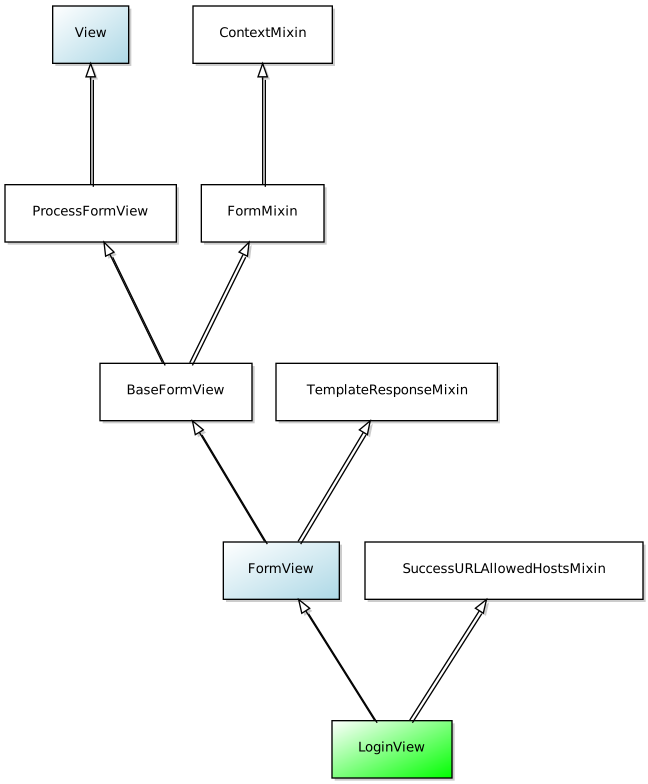 ## Conclusion Really easy to implement right out of the box but allows some nice customization. That being said, make those customizations IF you need to, not just because you think you want to. | 2019-12-15 | cbv-loginview | From [Classy Class Based Views](http://ccbv.co.uk/projects/Django/2.2/django.contrib.auth.views/LoginView/) `LoginView` > > Display the login form and handle the login action. ## Attributes * authentication_form: Allows you to subclass `AuthenticationForm` if needed. You would want to do this IF you need other fields besides username and password for login OR you want to implement other logic than just … | CBV - LoginView | https://www.ryancheley.com/2019/12/15/cbv-loginview/ |